Lesson 08 — A Complete Beginner Workflow
Practice the full Git/GitHub workflow from start to finish in a learner-owned practice repository.
By this point, the commands should start to feel less like separate facts and more like one repeatable work pattern.
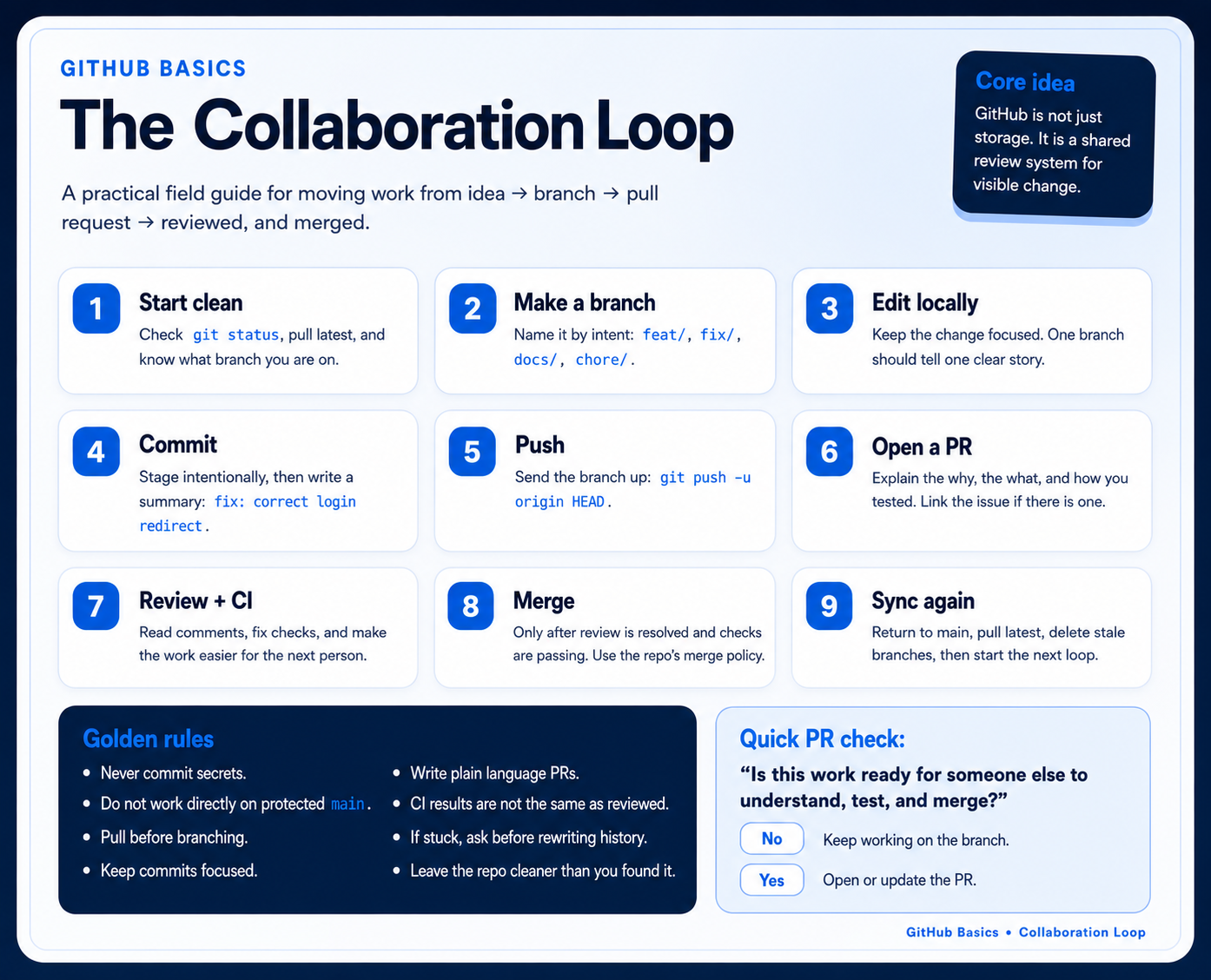
Use the GitHub Basics infographic as the map for this lesson. Each checklist section below corresponds to one part of the safe collaboration loop.
Full workflow
Section titled “Full workflow”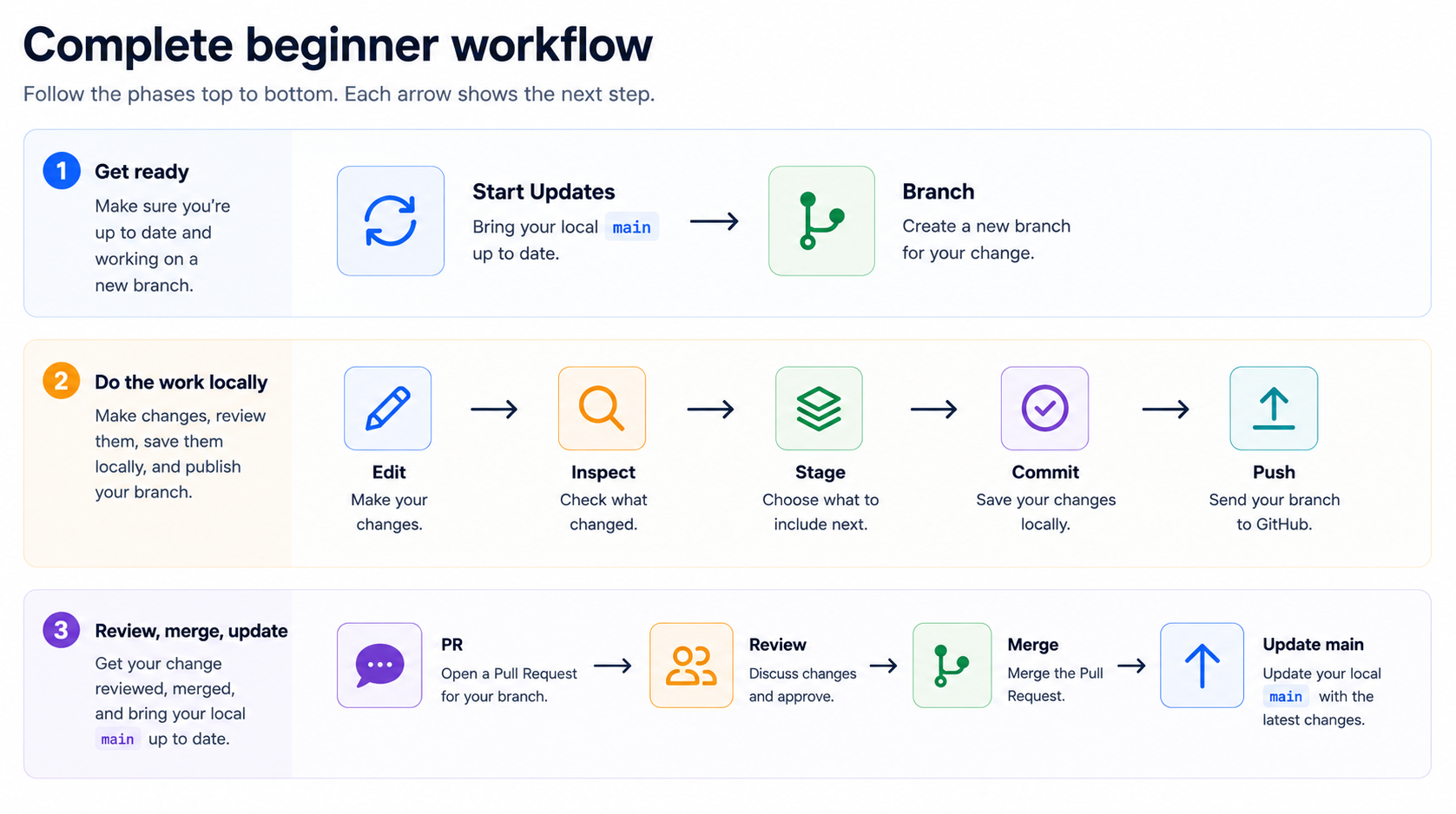
More explicitly, think of the workflow in four small phases:
| Phase | What you do | Commands or action |
|---|---|---|
| 1. Start current | Open the repo, switch to main, and bring in the latest shared work. | git switch main, git pull |
| 2. Work locally | Create a branch, make the change, inspect it, and stage only what belongs. | git switch -c ..., edit, git status, git diff, git add ... |
| 3. Save and share | Review the staged change, commit it locally, then push the branch to GitHub. | git diff --staged, git commit, git push |
| 4. Review and update | Open the PR, respond to review, merge, then update local main. | Open PR, review, merge, git switch main, git pull |
What each step is protecting
Section titled “What each step is protecting”| Step | What it protects |
|---|---|
git pull before starting | You do not build on stale work. |
| Branching | main stays stable while you work. |
git status | You know what Git sees. |
git diff | You catch accidental edits before staging. |
| Staging specific files | The commit contains only the intended change. |
| Committing | Your work has a local checkpoint. |
| Pushing | GitHub has your branch and commits. |
| Pull request | Someone can review before the change enters main. |
| Pulling after merge | Your computer catches up with GitHub. |
Adult-learning note: The goal is not to do this from memory immediately. Use the checklist until the rhythm becomes ordinary.
Practice scenario
Section titled “Practice scenario”Use git-basics-sql-practice or another git-basics- template repository.
Scenario: improve one data dictionary entry so another analyst can understand a field without asking for clarification.
Example file:
data-dictionary/fields.mdExample branch:
metadata/define-visit-dateExample commit message:
docs: define visit date fieldChecklist
Section titled “Checklist”1. Clone or open the repository
Section titled “1. Clone or open the repository”If you do not already have it locally:
git clone https://github.com/your-account/git-basics-sql-practice.gitcd git-basics-sql-practiceIf you already cloned it, open your terminal in that repository folder.
Check:
git status- I am inside the repository folder.
-
git statusworks without an error.
2. Start from main
Section titled “2. Start from main”git switch maingit pullIf your Git version does not support switch, use:
git checkout maingit pull- I am on an up-to-date
mainbranch.
3. Create a branch
Section titled “3. Create a branch”git switch -c metadata/define-visit-dateOr:
git checkout -b metadata/define-visit-dateConfirm:
git status- I created a branch for my change.
-
git statusshows I am on that branch.
4. Make a small change
Section titled “4. Make a small change”Edit one data dictionary entry in:
data-dictionary/fields.mdKeep the change small enough that a reviewer can understand it quickly.
Example revision, matching the table format in the template:
| `visit_date` | Calendar date when a fictional visit occurred, recorded in YYYY-MM-DD format | `2024-01-15` |- I made one small change.
- I saved the file.
5. Check status and diff
Section titled “5. Check status and diff”git statusgit diffBefore continuing, answer:
| Question | Answer |
|---|---|
| Which branch am I on? | |
| Which file changed? | |
| Are the changed lines intentional? |
- I can see my changed file.
- I reviewed the exact lines that changed.
- I do not see unrelated edits.
6. Stage the change
Section titled “6. Stage the change”git add data-dictionary/fields.mdCheck the staged version:
git diff --staged- I staged the file.
- I checked what is staged.
7. Commit the change
Section titled “7. Commit the change”git commit -m "docs: define visit date field"Then run:
git status- I committed the change.
- I know whether my branch is ahead of GitHub.
8. Push the branch
Section titled “8. Push the branch”git push -u origin metadata/define-visit-dateExpected result: Git sends the branch and commit to GitHub. The terminal may also print a link for opening a pull request.
- I pushed the branch to GitHub.
9. Open a pull request
Section titled “9. Open a pull request”On GitHub:
- choose your branch as the source branch,
- choose
mainas the target branch, - write a short title,
- explain what changed and why.
Useful PR description:
Defines the visit_date field so analysts know the expected date format.
Checks:- Reviewed git diff locally- Updated one data dictionary entry only- I opened GitHub.
- I created a PR from my branch into
main. - I added a short title and description.
10. Update if needed
Section titled “10. Update if needed”If feedback is requested, stay on the same branch and make another commit:
git statusgit diffgit add data-dictionary/fields.mdgit diff --stagedgit commit -m "docs: address feedback"git pushPushing to the same branch updates the existing PR.
- I understand that pushing to the same branch updates the PR.
11. Merge the PR
Section titled “11. Merge the PR”After review:
- The PR is approved or ready.
- The PR is merged.
- The branch is deleted on GitHub if no longer needed.
12. Update local main
Section titled “12. Update local main”git switch maingit pullOr:
git checkout maingit pull- My local
mainhas the merged change.
The full workflow as a decision table
Section titled “The full workflow as a decision table”| If this is true… | Do this next |
|---|---|
| You are not in the repository folder | cd into the repository, then run git status |
You are on main and about to edit | Create a branch first |
| You edited a file | Run git status and git diff |
| The diff shows unrelated changes | Stop and clean up before staging |
| The diff shows the intended change | git add filename |
| Work is staged | git diff --staged, then commit |
| Your branch is ahead locally | git push |
| The PR was merged | Switch to main and pull |
Final completion check
Section titled “Final completion check”- I completed one full Git/GitHub workflow.
- I can describe what Git knows, what GitHub has, what changed, and what happens next.
- I know to use branches instead of changing
maindirectly. - I know to use PRs for review before merging.
- I know that
git pushsends commits and does not commit file changes. - I know to run
git statusoften. - I know to run
git diffbefore staging.