Lesson 05 — Pushing and Pulling
Send committed work to GitHub and bring other people’s committed work from GitHub back to your computer.
The most important point in this lesson is simple: git push sends commits. It does not commit file changes for you.
Mental model
Section titled “Mental model”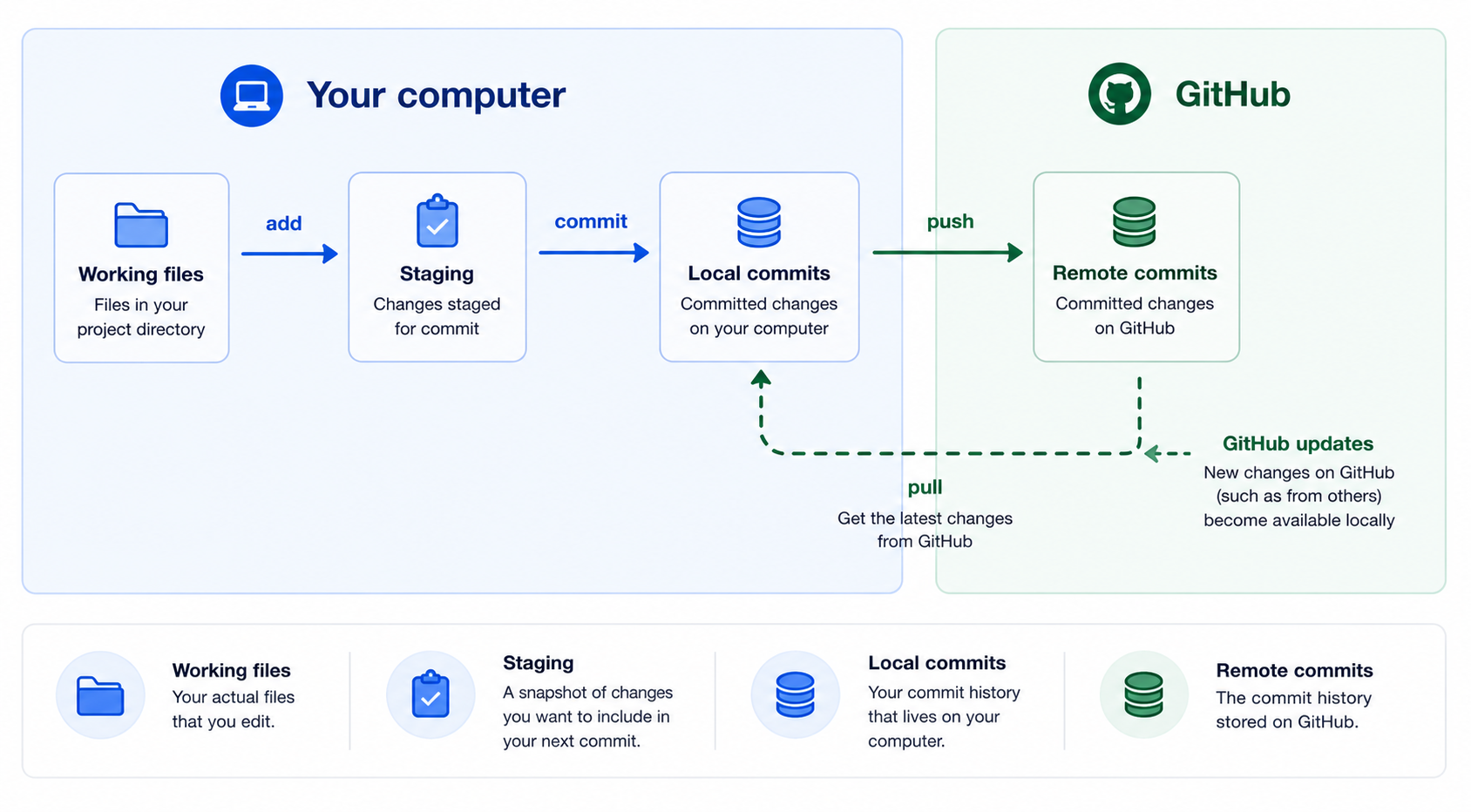
| Place | What lives there | Command that moves work |
|---|---|---|
| Working files | Unsaved or saved file edits | Save in your editor |
| Staging area | The next commit you are preparing | git add filename |
| Local Git history | Commits on your computer | git commit -m "message" |
| GitHub | Commits shared with others | git push and git pull |
Check yourself: If you only edited a file and did not commit, there is nothing for
git pushto send.
What push and pull mean
Section titled “What push and pull mean”git pushSends your local commits to GitHub.
git pullBrings new commits from GitHub to your computer and updates your current branch.
Before you start: read the situation
Section titled “Before you start: read the situation”Run:
git statusUseful status messages:
| Message shape | Meaning | Calm next step |
|---|---|---|
working tree clean | No uncommitted file changes | Pull or start work |
Changes not staged for commit | File edits exist but are not staged | Review with git diff |
Changes to be committed | Staged edits are waiting | Review with git diff --staged, then commit |
Your branch is ahead of 'origin/main' by 1 commit | You have a local commit GitHub does not have | Push |
Your branch is behind 'origin/main' | GitHub has commits you do not have | Pull |
Checklist
Section titled “Checklist”1. Start by pulling the latest changes
Section titled “1. Start by pulling the latest changes”Before making your own change, get the latest committed work from GitHub:
git pullExpected shape when nothing new is available:
Already up to date.- I pulled the latest changes from GitHub.
2. Make a small SQL-related change
Section titled “2. Make a small SQL-related change”Edit a file such as:
queries/01-count-visits.sqlFor practice, add a comment that explains the query:
-- Count total visits in the starter data.Save the file.
- I made one small file change.
- I saved the file.
3. Check status and diff
Section titled “3. Check status and diff”Run:
git statusgit diffGit should show that a file changed, and git diff should show the exact lines.
- I can see my changed file.
- I reviewed the exact change.
- I understand that an uncommitted file change will not be pushed.
4. Stage and commit the change
Section titled “4. Stage and commit the change”Stage the file:
git add queries/01-count-visits.sqlConfirm what will be committed:
git statusgit diff --stagedCommit the staged change:
git commit -m "docs: clarify visit count query"- I staged my changed file.
- I committed the change.
5. Confirm you have a commit to push
Section titled “5. Confirm you have a commit to push”Run:
git statusGit may say:
Your branch is ahead of 'origin/main' by 1 commit.That means you have a local commit that GitHub does not have yet.
- I know whether I have local commits to push.
6. Push your commit
Section titled “6. Push your commit”Run:
git pushIf this is the first push on a new branch, Git may ask you to use:
git push -u origin branch-nameThe -u connects your local branch to the branch on GitHub so future git push and git pull commands know where to go.
- My commit was pushed to GitHub.
7. Confirm on GitHub
Section titled “7. Confirm on GitHub”Open the repository in GitHub and check one of these:
-
the commit list,
-
the changed file,
-
or the branch page.
-
I opened the repository in GitHub.
-
I can see my change or commit.
Push does not mean “save everything”
Section titled “Push does not mean “save everything””Use this table when learners are unsure what has happened.
| What you did | Has Git saved a commit? | Will git push send it? |
|---|---|---|
| Edited a file but did not save it | No | No |
| Saved a file but did not stage it | No | No |
| Staged a file but did not commit | No | No |
| Committed the staged change | Yes, locally | Yes |
| Pushed after committing | Yes, locally and on GitHub | Already sent |
Beginner operating rhythm
Section titled “Beginner operating rhythm”Before starting work each day:
git pullBefore and after each major step:
git statusBefore staging:
git diffBefore committing:
git diff --stagedCompletion check
Section titled “Completion check”- I can push commits to GitHub.
- I can pull changes from GitHub.
- I understand that push sends committed work up.
- I understand that push does not commit file changes.
- I understand that pull brings GitHub commits down.