Lesson 04 — Status, Staging, and Commits
Make one small change in the practice repository, inspect what changed, and save it in Git history as a commit.
This lesson is deliberately slow. The skill is not typing commands quickly; the skill is knowing what Git knows before you move to the next step.
Mental model
Section titled “Mental model”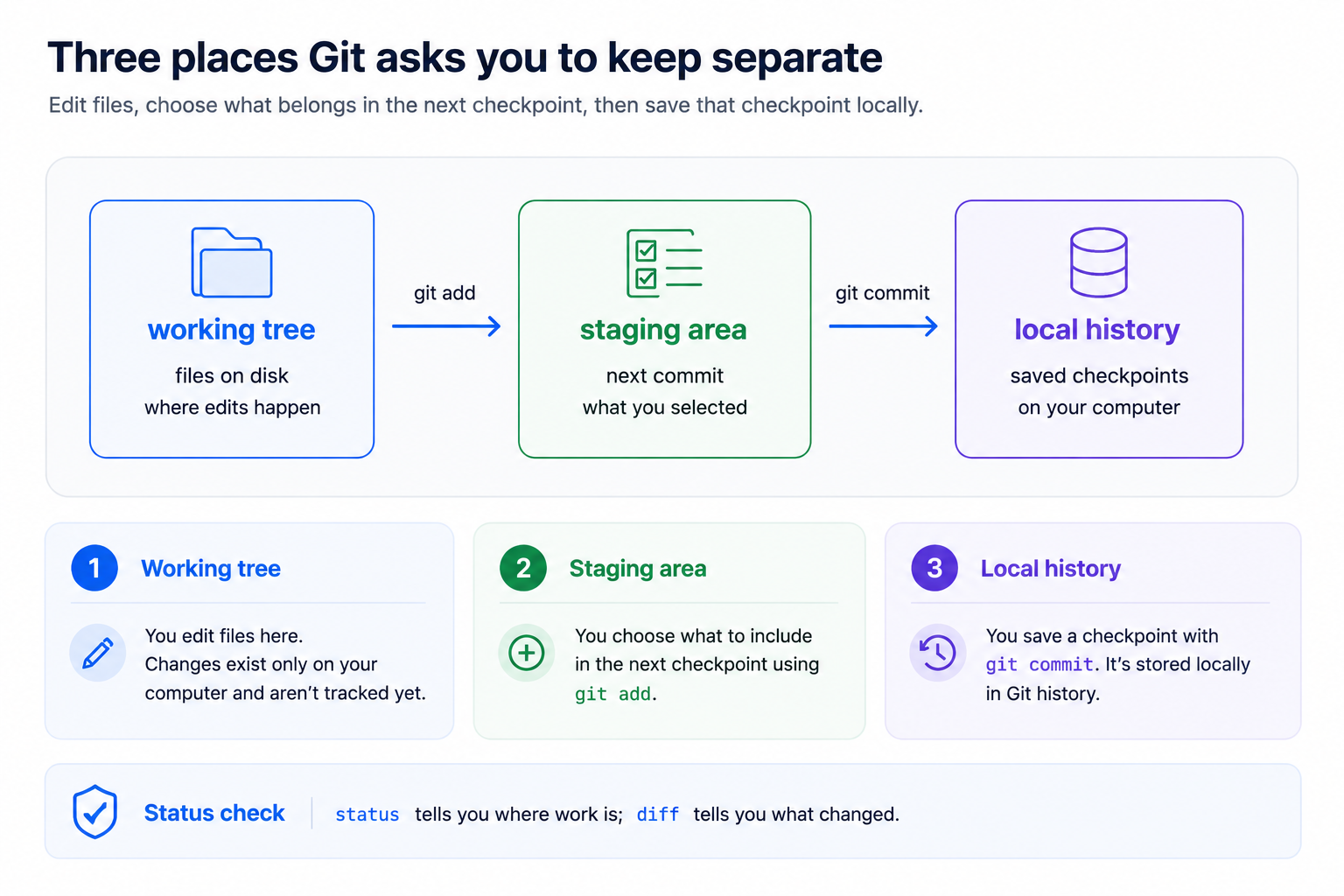
Git tracks three useful questions:
| Question | Command | What you learn |
|---|---|---|
| What does Git see right now? | git status | Branch, changed files, staged files, and next-step hints |
| What exactly changed? | git diff | Line-by-line unstaged edits |
| What is ready to be committed? | git diff --staged | Line-by-line staged edits |
Calm habit: Run
git statuswhenever you feel unsure. It is a diagnostic command, not a test.
Core workflow
Section titled “Core workflow”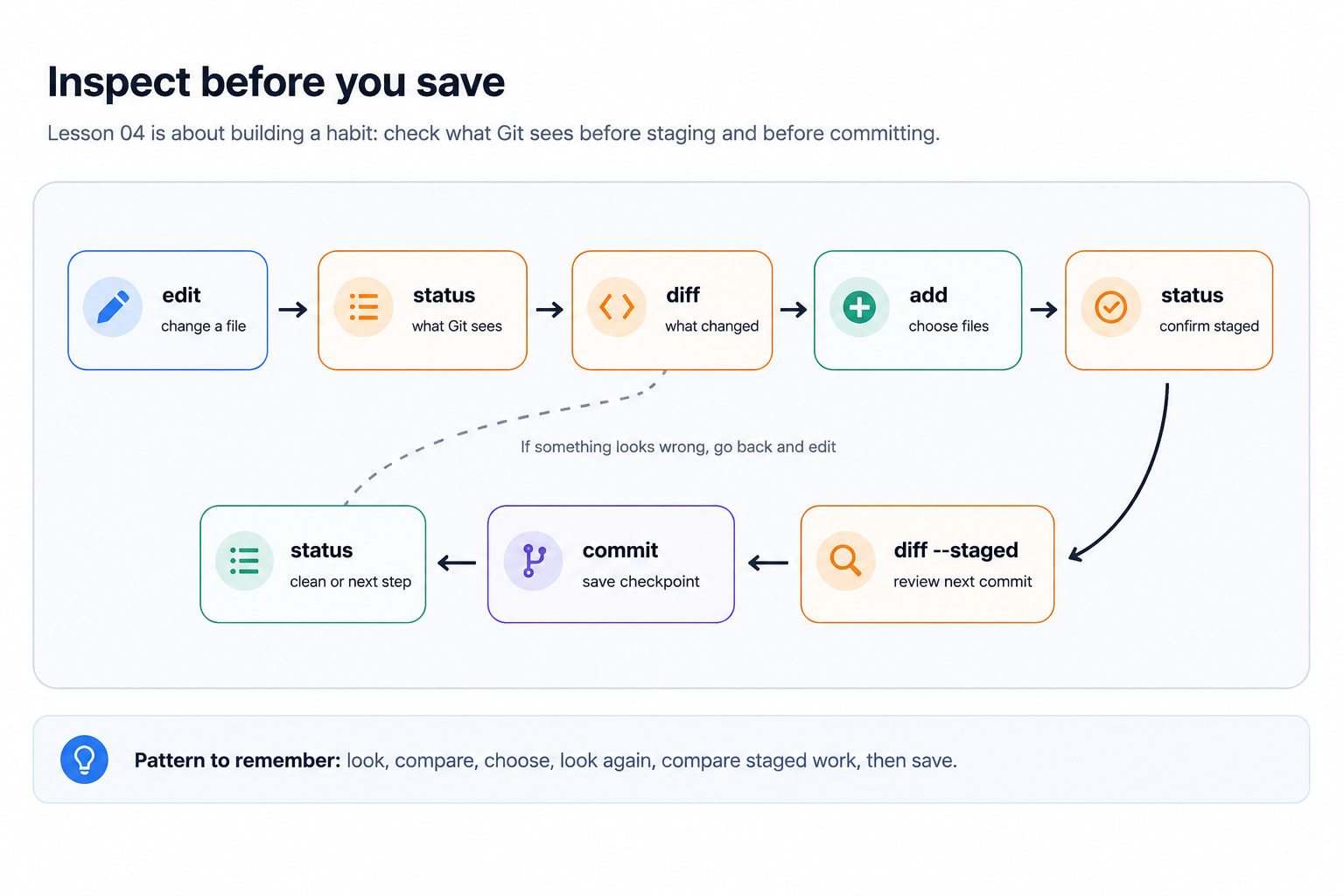
What these commands mean
Section titled “What these commands mean”git statusShows what Git knows about your working tree, staging area, current branch, and relationship to GitHub.
git diffShows the exact text changes that are not staged yet.
git add filenameStages a file. Staging means: “include this version of this file in my next commit.”
git diff --stagedShows the exact text changes currently staged for the next commit.
git commit -m "message"Creates a saved checkpoint in local Git history.
Important: A commit is local until you push it. A push sends commits to GitHub; it does not create commits from unsaved file changes.
Checklist
Section titled “Checklist”1. Start clean
Section titled “1. Start clean”Run:
git statusExpected if nothing is pending:
On branch mainYour branch is up to date with 'origin/main'.
nothing to commit, working tree clean
If Git lists changes, pause and decide whether they belong to this exercise before continuing.
- I know which branch I am on.
- I know whether my working tree is clean or has changes.
2. Make one small change
Section titled “2. Make one small change”In git-basics-sql-practice, open:
analysis-notes/visit-count-notes.mdAdd one short note about the question an analysis should answer.
Example:
This query should help us confirm whether visit counts changed by county.Save the file in your editor.
- I made one small file change.
- I saved the file.
3. Check status again
Section titled “3. Check status again”Run:
git statusExpected shape:
Changes not staged for commit: modified: analysis-notes/visit-count-notes.mdThis means Git sees a saved file change, but the change is not staged yet.
- I can see the changed file listed.
- I understand this change is not committed yet.
4. Review the exact change
Section titled “4. Review the exact change”Run:
git diffRead the output before staging. Look for your new line and check that no unrelated edits appear.
Diffs use a consistent pattern:
- lines removed from the file+ lines added to the file- I reviewed the exact lines I changed.
- I do not see unrelated edits.
5. Stage the changed file
Section titled “5. Stage the changed file”Run:
git add analysis-notes/visit-count-notes.md- I staged the file.
6. Check what is staged
Section titled “6. Check what is staged”Run:
git statusgit diff --stagedExpected shape from git status:
Changes to be committed: modified: analysis-notes/visit-count-notes.mdgit diff --staged should show the same intentional change you reviewed earlier.
- I can see that the change is staged.
- I reviewed what will go into the commit.
7. Commit the change
Section titled “7. Commit the change”Run:
git commit -m "docs: add analysis note"Expected shape:
[main abc1234] docs: add analysis note 1 file changed, 1 insertion(+)The identifier will be different on your computer.
- I created a local commit.
8. Check status one more time
Section titled “8. Check status one more time”Run:
git statusExpected shape:
nothing to commit, working tree cleanIf Git says your branch is ahead of origin/main by one commit, that is also useful information: your commit exists locally and has not been pushed to GitHub yet.
- Git says there is nothing to commit.
- I know whether this local commit still needs to be pushed.
Good commit messages
Section titled “Good commit messages”A good commit message is short, specific, and written for the next person who reviews the history.
| Less helpful | More helpful |
|---|---|
updates | docs: add analysis note |
fix stuff | docs: clarify visit count query |
changes | fix: correct county label typo |
More examples:
docs: add analysis notedocs: clarify visit count querydocs: define visit date fieldfix: correct county label typoIf something looks wrong
Section titled “If something looks wrong”| Situation | Safe next step |
|---|---|
| You changed the wrong file | Do not stage yet. Ask for help or use your editor to undo the file. |
git diff is empty but you expected changes | Save the file and check you are in the right repository. |
| You staged too much | Ask for help before using reset commands. |
| You are not sure what happened | Run git status and read the branch and file sections aloud. |
Completion check
Section titled “Completion check”- I can make a small change.
- I can review the change with
git diff. - I can stage a specific file with
git add filename. - I can review staged work with
git diff --staged. - I can commit a change with
git commit. - I understand that commits are local until pushed.