Practice Checklist
Use this checklist inside a learner-owned copy of a practice template, preferably git-basics-sql-practice.
The same pattern should be repeated several times with small changes. The objective is comfort with the workflow, not speed.
Keep the GitHub Basics infographic open while practicing. When you get stuck, find your current step on the visual loop and run git status before deciding what to do next.
The repeatable pattern
Section titled “The repeatable pattern”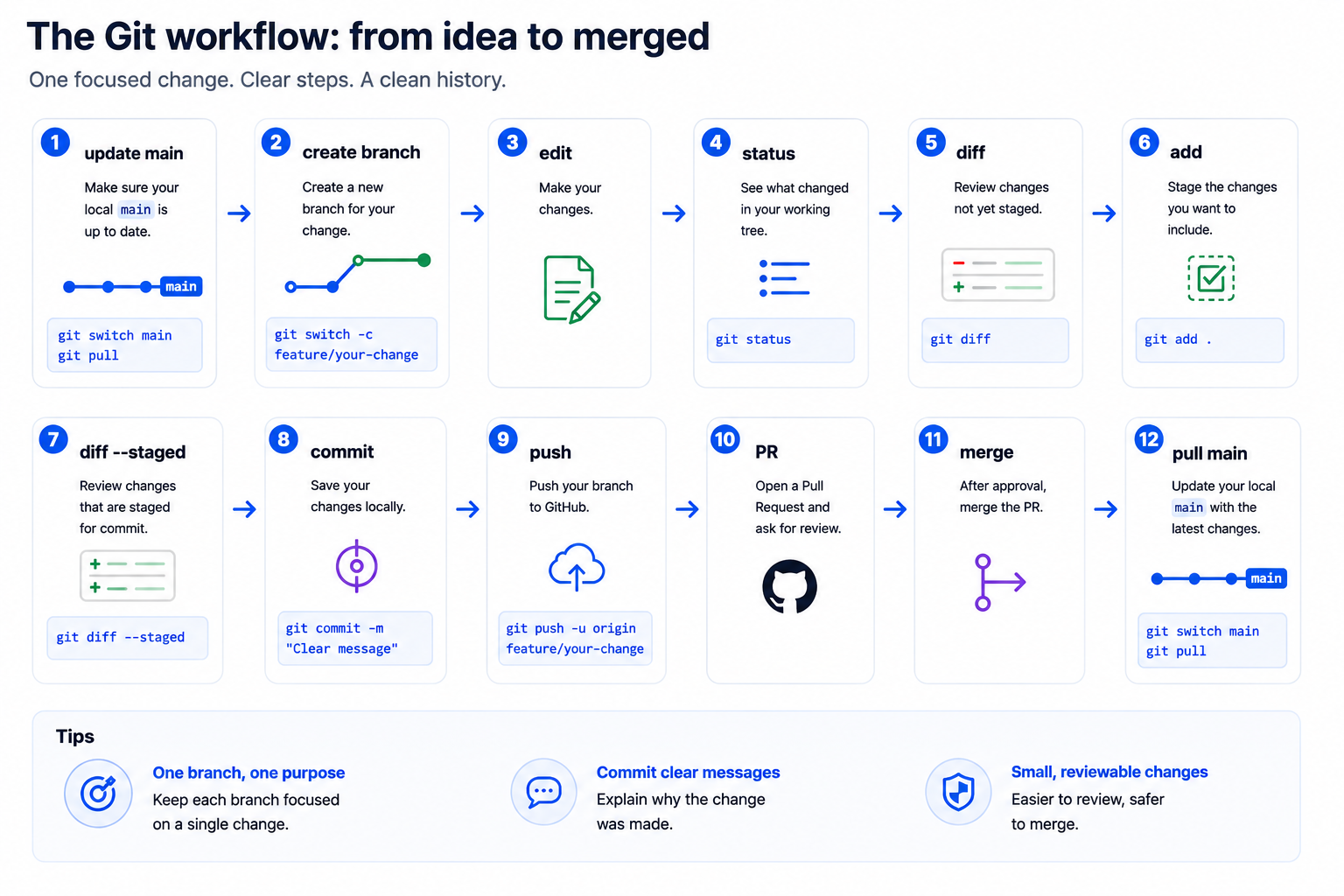
Before each round
Section titled “Before each round”git switch maingit pullgit statusIf git switch is not available, use git checkout main.
- I am on
main. - My local copy is up to date.
-
git statusdoes not show leftover changes from another exercise.
Round 1 — Edit an analysis note
Section titled “Round 1 — Edit an analysis note”| Step | Command or action |
|---|---|
| Create branch | git switch -c docs/add-analysis-note |
| Edit | Open analysis-notes/visit-count-notes.md |
| Inspect | git status then git diff |
| Stage | git add analysis-notes/visit-count-notes.md |
| Check staged work | git diff --staged |
| Commit | git commit -m "docs: add analysis note" |
| Push | git push -u origin docs/add-analysis-note |
- Add one short note about what the starter query is intended to answer.
- Open a pull request.
- Merge it after review.
- Switch back to
mainand pull the merged change.
Round 2 — Update a SQL query comment
Section titled “Round 2 — Update a SQL query comment”| Step | Command or action |
|---|---|
| Create branch | git switch -c analysis/clarify-visit-query |
| Edit | Open queries/01-count-visits.sql |
| Inspect | git status then git diff |
| Stage | git add queries/01-count-visits.sql |
| Check staged work | git diff --staged |
| Commit | git commit -m "docs: clarify visit count query" |
| Push | git push -u origin analysis/clarify-visit-query |
- Add or improve a comment that explains what the query counts.
- Open a pull request.
- Update the PR if feedback is requested.
- Merge the PR and pull the latest
main.
Round 3 — Improve a data dictionary entry
Section titled “Round 3 — Improve a data dictionary entry”| Step | Command or action |
|---|---|
| Create branch | git switch -c metadata/define-visit-date |
| Edit | Open data-dictionary/fields.md |
| Inspect | git status then git diff |
| Stage | git add data-dictionary/fields.md |
| Check staged work | git diff --staged |
| Commit | git commit -m "docs: define visit date field" |
| Push | git push -u origin metadata/define-visit-date |
- Add or revise one field definition.
- Open a pull request.
- Merge the PR after review.
- Pull the latest
main.
Round 4 — Practice responding to PR feedback
Section titled “Round 4 — Practice responding to PR feedback”Use the same branch if a reviewer asks for a correction.
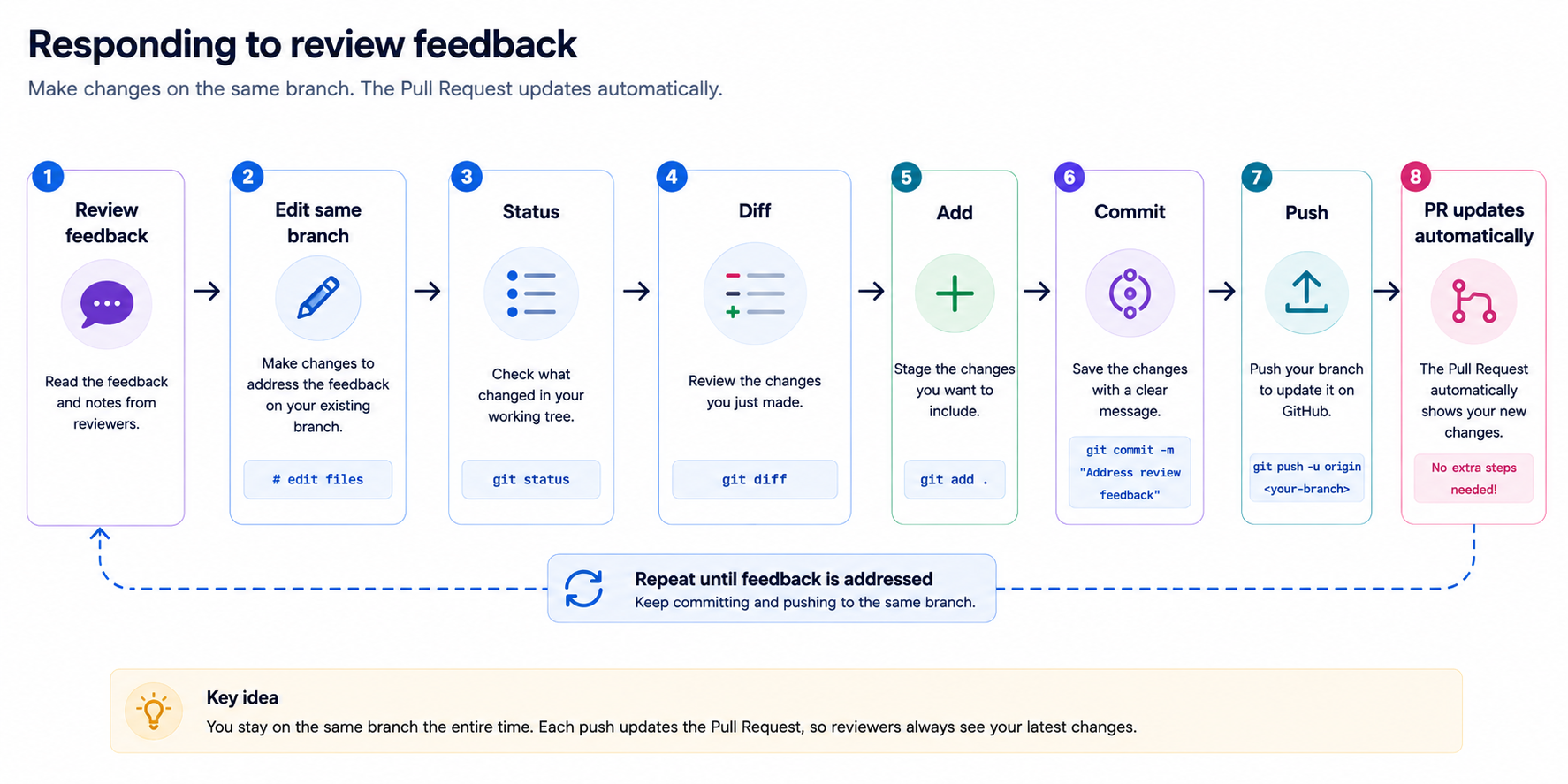
- Make the requested change locally.
- Run
git status. - Run
git diff. - Stage the correction.
- Run
git diff --staged. - Commit with
docs: address review feedback. - Push again.
- Confirm the existing PR updated automatically.
Quick diagnosis table
Section titled “Quick diagnosis table”| If you see or think… | First safe check |
|---|---|
| “I do not know where I am.” | git status |
| “Did I save the file?” | Save in editor, then git status |
| “What exactly changed?” | git diff |
| “What will be committed?” | git diff --staged |
| “Did I create a commit?” | git status or git log --oneline -5 |
| “Did GitHub get my work?” | Check the branch/PR on GitHub after pushing |
| “Can I push uncommitted changes?” | No. Push sends commits only. |
Reflection questions
Section titled “Reflection questions”- What command tells you what Git sees right now?
- What command shows the exact text changed before staging?
- What command shows the exact text staged for commit?
- What command saves a local checkpoint?
- What command sends committed work to GitHub?
- What command brings GitHub changes down to your computer?
- Why do we use branches for small changes?
- Why do we use pull requests before merging?